|
 |
|
|
Philips Pronto Classic Family File Area
|
|
 |
|

10/10/25 - It’s been so long since we’ve last seen you!
10/24/22 - In searching for the perfect day, Timmy discovers something unexpected!
|
|
 |
|
|
The following page was printed from remotecentral.com:
In this section: Hundreds of black & white and full color CCF files complete with devices, codes, macros, buttons and bitmaps! Custom filter: For those with classic black and white LCD models, this section is our largest yet. (Remove)

| Page 36 of 72
|
Black & White Remotes - System Layout Files Displaying entries 351 through 360, of 719 available.
Chris Bain's Pronto CCF
Added by Chris Bain | 1999 | 10,375 views
Complete system CCF featuring DirecTV favorite channel icons (updated for the new July '99 lineup), discrete power codes and more!
Designed for:
Philips Pronto TS-1000 & RU890
|
|
Eduardo Maroja's RC5000
Added by Eduardo Maroja | 2001 | 10,323 views
With complete ir controls in independent hidden panels. Ideal for macros and use with other ccfs. With Directv channels (Brazil version).
Peter Park's Home Theater
Added by Peter Park | 2000 | 10,320 views
A complete system CCF file with the following devices.
Designed for:
Philips Pronto TS-1000 & RU890
|
|
Marc Jones' Complete CCF
Added by Marc Jones | 2002 | 10,317 views
This CCF is made up of various design elements from many other CCF's on here, although the layouts and look of some screens have been changed slightly. I've tried to make the design as user friendly and self explanatory as possible (girlfriend proof!). I've incorporated 'work-around' discrete codes for my Plasma (thanks Ofer) and DVD player. I hope you like it!
Designed for:
Philips Pronto TS-1000 & RU890
|
|
Michael Railing's Pronto
Added by Michael Railing | 2001 | 10,312 views
Completely updated system, still based on Daniel Tonks' buttons (and others). Discrete codes for all devices, including full CD and DVD databases for all CDs and DVDs (Super Nudelist). Cleaned up original interface with new equipment upgrades. Discrete Codes for such items as Sound Field Selection, Tuner Inputs, Power Switches, and Light Controls (X-10). Includes a 1 button control to dim all lights to Movie brightness.
Designed for:
Philips Pronto TS-1000 & RU890
|
|
Bryan Williams' Pronto Setup
Added by Bryan Williams | 2000 | 10,288 views
I've gone function over form here. This program does it all -- scrolls through tedious Toshiba video inputs, turns off and on devices through logical paths, etc. Not all learned functions work well, but logic is excellent. If you interrupt one step it will lose its place requiring a manual fix, but it knows what is on and what is off from any point. Will switch from one component to any other with 2 button presses. The sundial is for switching components, the lightening bolt is for power off, and the circled R is for recording with DISH IR blaster (doesn't work so hot in my room). Made most buttons from scratch using Power Point and internet images.
Designed for:
Philips Pronto TS-1000 & RU890
|
|
Daryl Holtz's Home Theater CCF
Added by Daryl Holtz | 2006 | 10,282 views
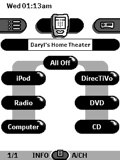
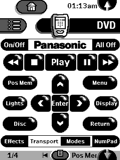
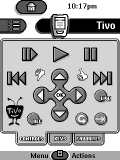
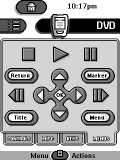
I’ve upgraded all my components since the last time I submitted a CCF file. My latest system CCF is easy to read and use. Home panel consists of macro buttons that adjust the entire system with a single touch. Consistent interface for all devices. Large black transport buttons. An “All Off” button on every panel that shuts down entire system and jumps to Home. A navigation bar at the bottom of every panel to jump to other panels within the device.
Designed for:
Philips Pronto TS-1000 & RU890
|
|
David VanOstrand's Pronto CCF
Added by David VanOstrand | 2001 | 10,282 views
This is my first posted ccf on the forum and I am very proud of my work. This file is based on Dale's latest Amazing Pronto. Thanks -- I've had my Pronto for over a year and never appreciated it more. It includes a jump feature, a hard button action menu accessible from anywhere, Toshiba inputs Macros, surf macros for TiVos and Toshiba TVs, some custom bitmaps, and a simple on/off scheme. There are no discrete power codes.
Designed for:
Philips Pronto TS-1000 & RU890
|
|
Ralph Erps' Home Theater
Added by Ralph Erps | 2004 | 10,280 views
This is a complete system CCF designed and tweaked for simple everyday use by anyone. It includes as many discrete power and input commands as I could find. Goal was to limit number of buttons on each screen to most commonly used to minimize congestion. Each device contains complete IR controls in independent hidden panels to simplify future modifications and or upgrades to equipment. Many thanks to all for the graphics, programming, and macro ideas I have used.
Designed for:
Philips Pronto TS-1000 & RU890
|
|
Chris Buck's Complete CCF
Added by Chris Buck | 2001 | 10,265 views
This complete CCF (which has taken a year in total to get right) was made using help from many others found on Remote Central. There were many devices that I couldn't find, so these are original, as are some some of the backrounds & buttons. |
Search Remote Central's Files
Share with the remote control community
by uploading a file to Remote Central!
|
|
|
|
|